The welcome demo experiment
A complete measurement on one PC, with no instrument attached: the first thing
to try on a new bench. It runs the PLESTY experiment pol-pl —
polarisation-resolved photoluminescence — which turns a half-wave plate and
takes a spectrum at each angle. Two devices take part: a device is one
instrument as the bench serves it. Here the rotation stage runs in its
simulator, and the spectrometer replays spectra really measured in the lab, so
the run, its data, its plots and its report are those of a real measurement.
Start it
The first start of an empty bench opens Welcome to PLESTY Bench; Help ▸ Welcome… opens it again at any time.
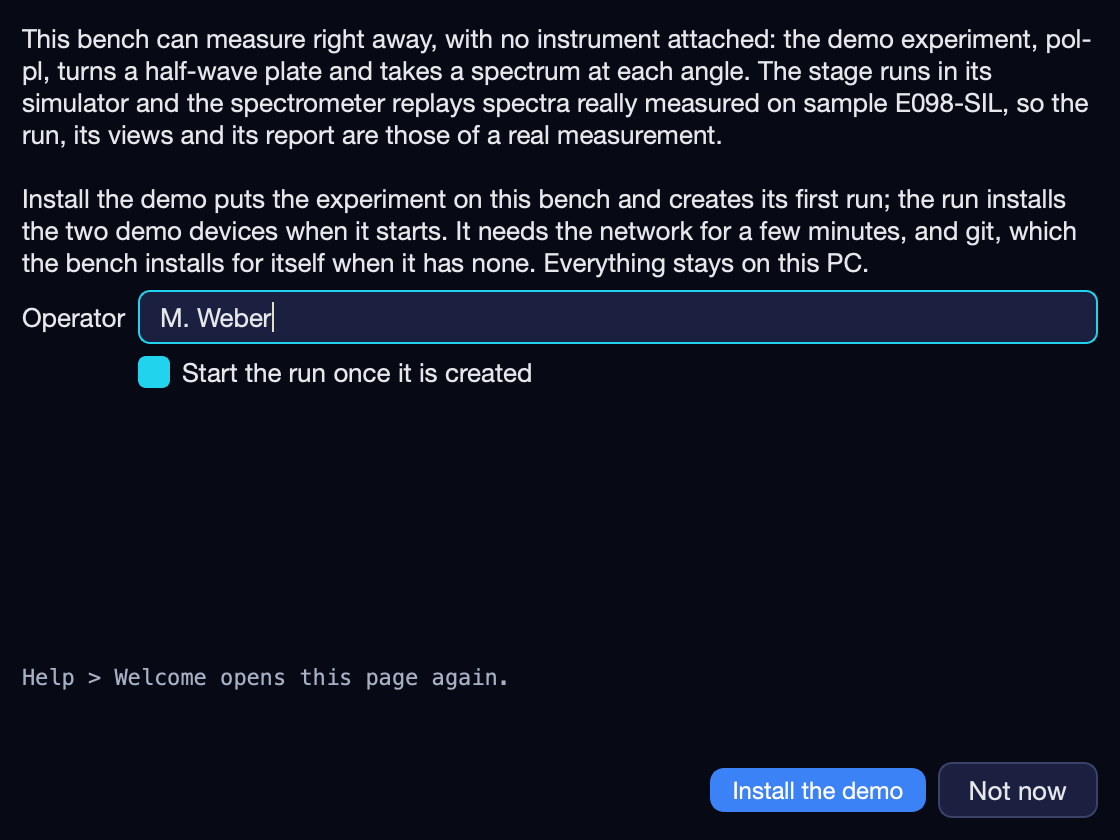
Operator: your name. It is kept with the run, and proposed for the next one.
Leave Start the run once it is created ticked to measure at once. Unticked, the run is created and waits for Run
 .
.Press Install the demo. Not now closes the page; it does not open by itself again.
It needs the network for a few minutes, and git, which the bench installs for itself on Windows when it has none. Nothing leaves the PC.
What it sets up
Experiment |
|
First run |
|
Stage — |
The Thorlabs K10CR1 rotation stage, the released |
Spectrometer — |
A fixed commit of the |
All three are pinned — the experiment by its release tag, the two devices by
that release’s setup.yaml — so a bench runs the same demo however the
repositories move on.
| Folder | <home>/demo/pol-pl — the runs and the spectrometer replaying them share it. <home> is the bench’s home folder. |
The run measures quantum dot QD-002 with the half-wave plate turned from 0° to
178° in 2° steps — 90 angles, a 3 s exposure each. Those are the angles the
recording holds; the spectrometer refuses any other rather than answer with a
different spectrum. The experiment cannot tell the replay from an instrument,
and there is no demo mode in it: config/demo.yaml is the configuration a
hardware run takes, set to the sweep that was recorded.
The two devices are brought up by the run itself when it starts, from the
experiment’s setup — they appear on the Devices tab while it measures.
The folders the spectrometer is given reach it only while the demo serves it;
another experiment that uses a spectrometer called spec does not inherit
them.
Watch it
While the run measures, the banner across the top of the window names it, how far it has got and how many of its devices are up — pol-pl · pol-pl-20261027-001 · 41/90 steps · devices 2/2 up. Select the run on the Experiments tab:
Log — what the run prints, one line per angle.
Data — each step’s record: the angle, the spectrum’s file and what the analysis found in it.
Visualization — the experiment’s own plots of the run.
Each pane is described in The Experiments tab.
The result
When the last angle is done the run reads completed, and its folder,
<home>/demo/pol-pl/<run>, holds:
raw/spec/— the 90 spectra, one file per angle;the run’s journal, records and configuration;
report.html— the run’s report: data, analysis, notes and device setup in one file. Open run opens the folder; the Report pane names the file.
How to read it is in Run results.
Afterwards
Measure again — select the run and press Duplicate
 , then Run; or
Create
, then Run; or
Create  a new run of
pol-pland change its settings in Configure first. Each run is a new folder beside the first.Across two PCs — the same experiment with the spectrometer on another bench is Run a cross-bench experiment.
Your own instrument — Set up a bench from installing its module to a running device.
Remove it — Experiment ▸ Remove experiment drops the declaration; its runs stay in
<home>/demo. Hub ▸ Installed modules… then uninstalls the module.