Run an experiment
An experiment module runs a whole measurement: it drives several instruments through a plan of steps and records what they return. The bench installs it, lets you configure each run, starts the instruments it needs — on this bench and on others — and keeps every run’s data and report together.
The example is plesty-pol-pl, which turns a half-wave plate on one bench and
reads a spectrometer on another.
1. Install the experiment
Hub ▸ Browse…, set the kind to experiments, select the module and install it from its Repository (git) — an experiment’s configuration files are in its repository, not in its release. A module you are editing can be used where it is instead: Hub ▸ Load from…. See Install and update modules.
Installing fills the module’s .env with a line for every setting its setup
needs, so you can fill them in at step 3.
2. Create a run
A run is one measurement, in a folder of its own.
On the Experiments tab, press Create
 .
.Experiment: the module. One not yet declared on this bench is declared for you.
Config: the configuration file to start from — the module ships one or more under
config/.Run name: proposed as
<experiment>-<date>-<number>; change it if you like.Operator: your name — proposed from the last run on this bench. Note: what this run is for, if you like.
Create.
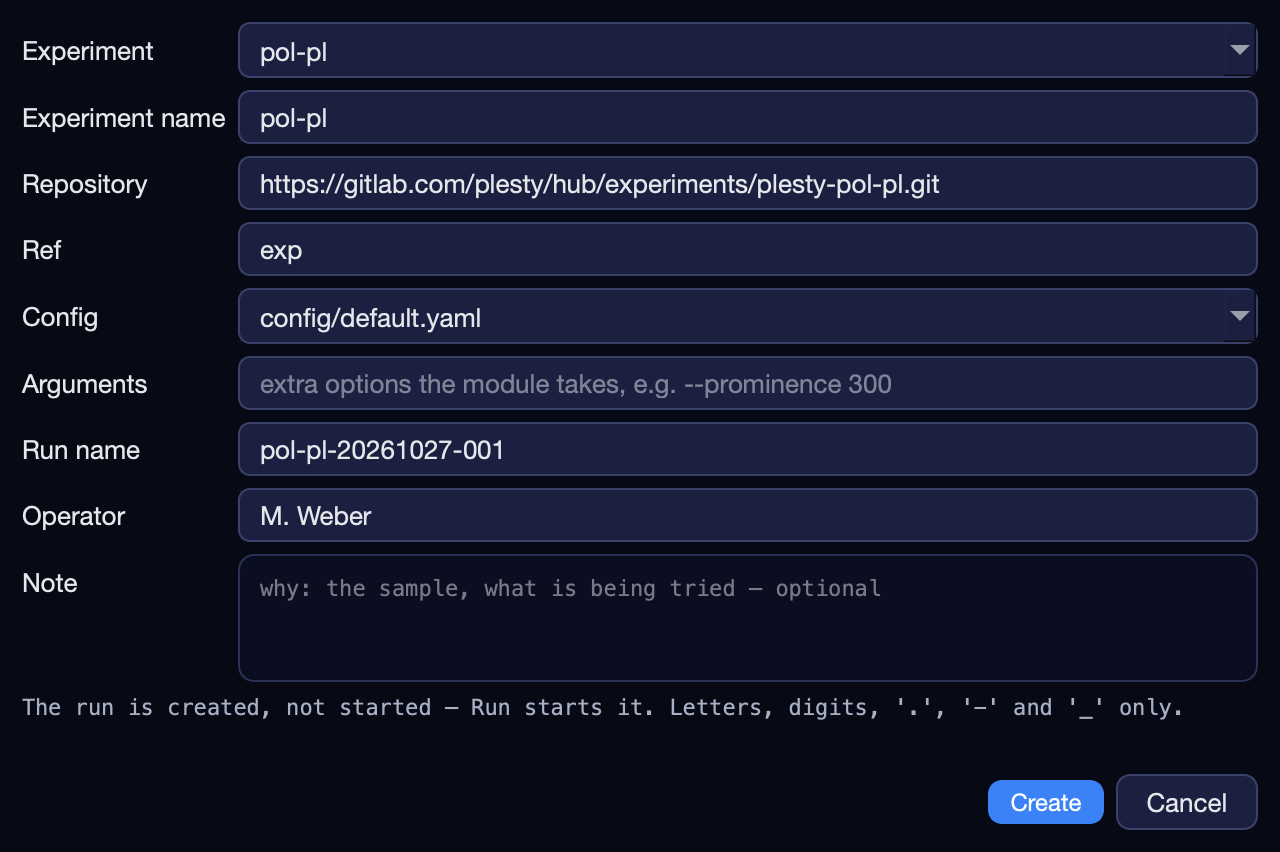
The run appears in the table as created. Its configuration was copied into
its folder, so nothing you change later for other runs affects it.
3. Configure it
Select the run and press Configure  .
.
Experiment Config is this run’s settings, laid out from what the module declares: a box per group, a unit beside every number, limits the field will not go past. Grey text in an empty field is the default. Edit YAML… opens the file itself for anything the form does not show.
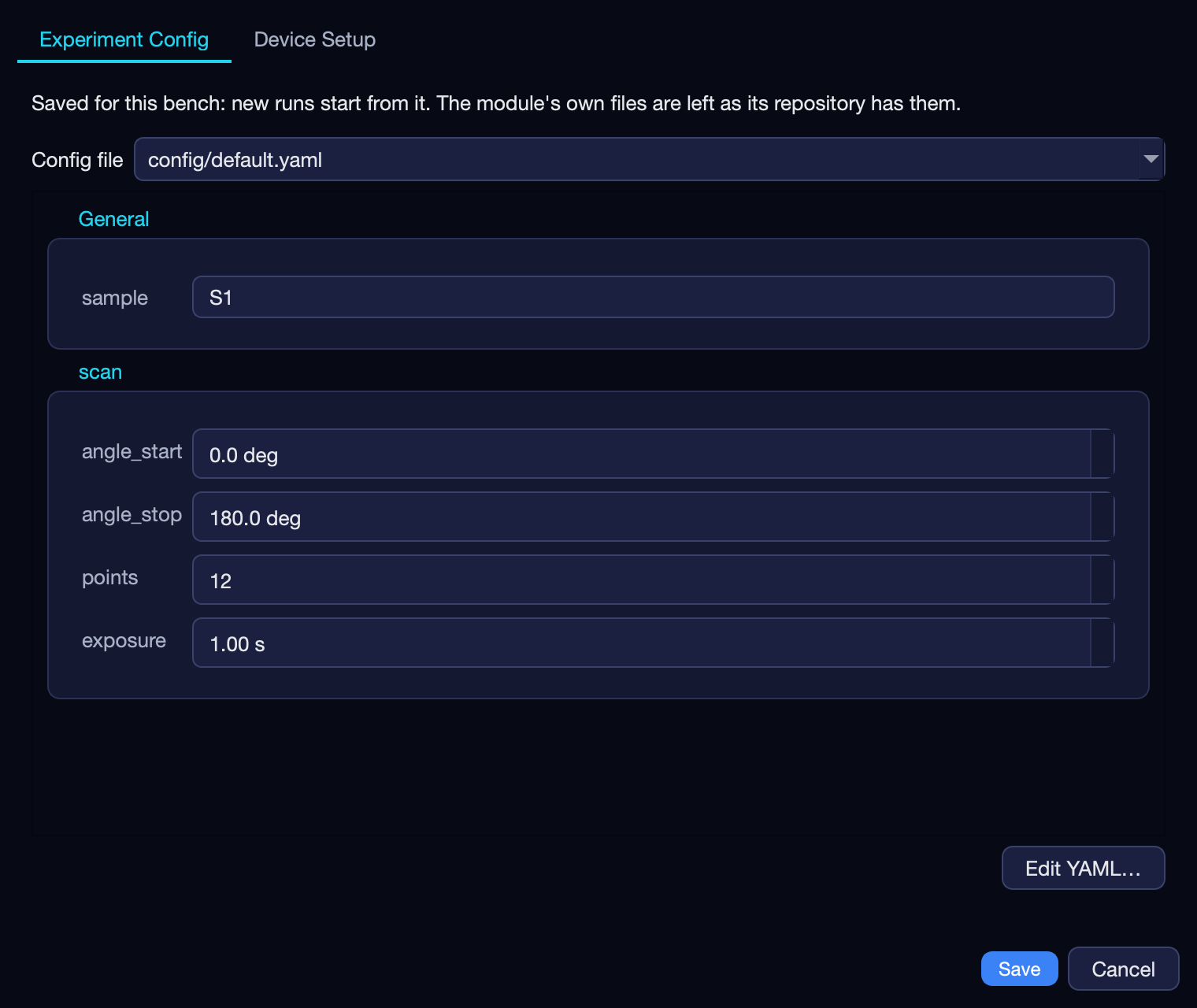
A run that has started shows its configuration read-only — its plan was built
from it. To measure again with changes, select it and press
Duplicate  .
.
The benches and the shared disk
Device Setup is where the instruments are. It edits the module’s
setup.yaml together with the .env beside it.
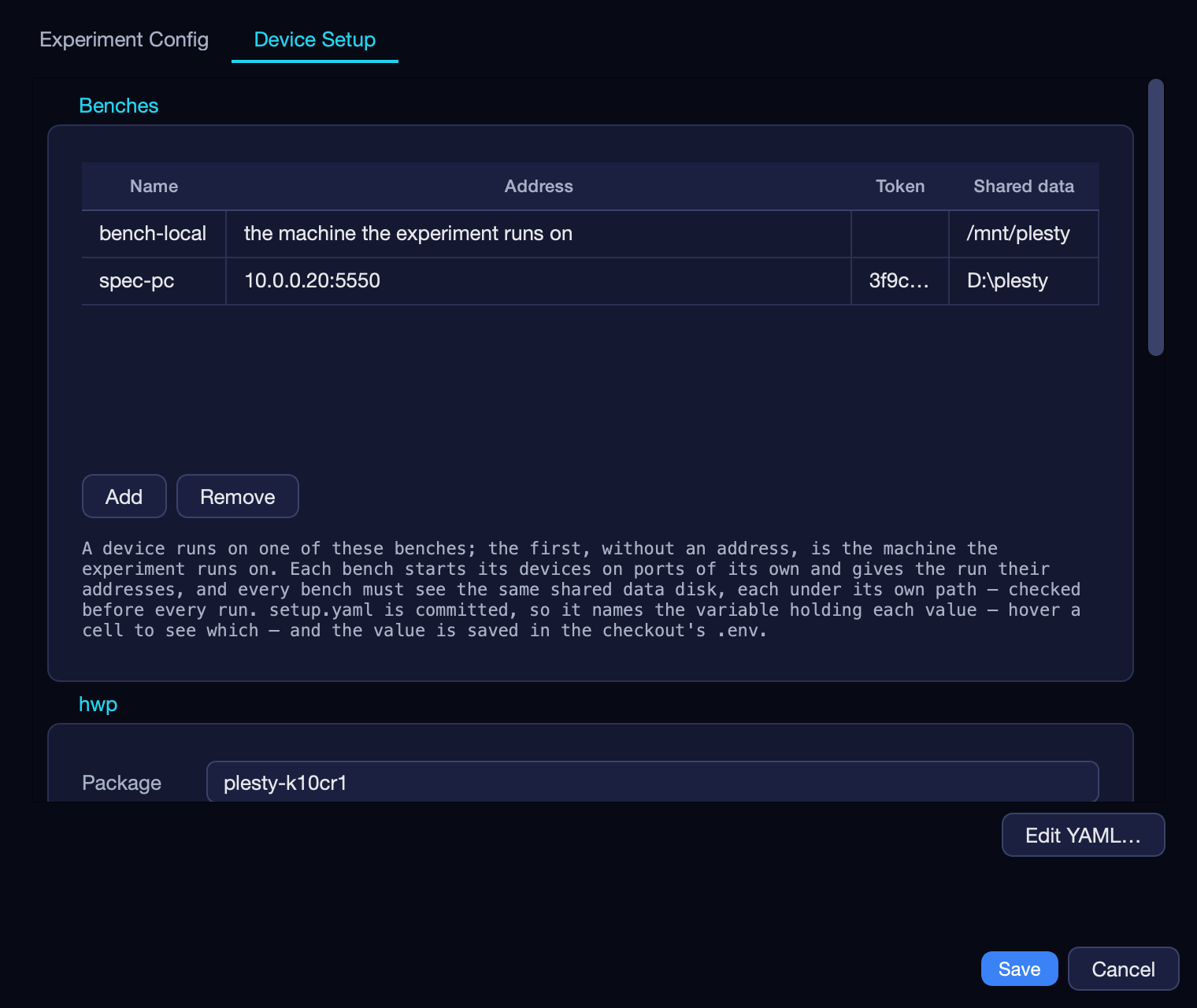
Benches — a row per bench PC the experiment uses. The first row is the machine the experiment runs on. For every other bench, fill in the Address of its agent and its Token — both from that bench’s Server ▸ Configure… — and make sure it serves its agent (Server ▸ Start agent).
Shared data — where that bench sees the lab’s shared data disk: the one network folder every bench can write to, each under its own path —
/mnt/plestyon one,D:\plestyon another. Runs are written there, so an instrument on any bench can write into a run.A group per device — its package, its Host (which bench runs it), and its repository, ref or version, arguments and environment. A device names no port: its bench picks one.
Save writes the values into the checkout’s .env, readable by you alone,
and into setup.yaml only the name of the variable holding each — setup.yaml
is committed with the module, so it never carries an address or a token. A new
bench’s variables are named after it: LAB_PC_ADDRESS, LAB_PC_TOKEN,
LAB_PC_DATA. Hover a cell to see which.
setup.yaml looks like this:
version: 1
benches:
  bench-local:                    # no address: the machine the experiment runs on
    data: ${LOCAL_DATA}
  spec-pc:
    data: ${SPEC_PC_DATA}         # where spec-pc sees the same disk
    address: ${SPEC_PC_ADDRESS}   # where its agent listens
    token: ${SPEC_PC_TOKEN}
devices:
  hwp:
    package: plesty-k10cr1
    host_name: bench-local
  spec:
    package: plesty-lightfield-spectrometer
    host_name: spec-pc
4. Run it
Select the run and press Run  (Ctrl+Shift+R). A small window names each instrument while it is being opened;
closing it stops nothing.
(Ctrl+Shift+R). A small window names each instrument while it is being opened;
closing it stops nothing.
What Run does
Before the measurement starts, the bench:
Checks the shared disk. It writes a small file under its own Shared data, and every other bench reads it under its own and writes an answer. A bench that sees a different folder, or cannot write to it, stops the run with its name. Benches with no Shared data are not checked, and nothing is checked when this machine has none.
Starts each instrument on its bench. A bench that does not have the device yet declares it from the setup. One that has it with other settings takes the setup’s settings and restarts it. Each device is told where its bench sees the shared disk.
Tells the run where this machine sees the disk and where each instrument listens.
When the run ends — completed, stopped or aborted — the instruments it started are stopped again, each on its bench. One that was already running is left running: someone else started it. One the run had to restart with the setup’s settings counts as started by the run.
Setting a device’s address by hand — HWP_ADDRESS=tcp://… in the checkout’s
.env, or in the experiment’s env: in the fleet file — points the run at
it, and the bench leaves that device alone. Useful for a simulator or a server
someone else runs.
5. Watch it
The run’s row shows its progress — 5/12 steps and what the step in flight
reported. Its panes show the Log, the Data committed so far and the
Visualization. See The Experiments tab.
A note for whoever reads the data later — a helium top-up, a realignment: Add report in the Report pane, or Experiment ▸ Report…. It goes into the run’s journal between the steps it happened between.
The run is a job of its own: closing the console does not stop it.
6. Pause, stop or abort
Button |
Icon |
Does |
Then |
|---|---|---|---|
Pause |
|
Holds before the next step, instruments connected and where they are. |
Continue carries on at once. |
Stop |
|
Lets the step in flight finish, then stops. Nothing is lost. |
Resume continues from the next step. |
Abort |
|
Stops now; the instruments are released at once. |
Resume repeats the unfinished step. |


All three wait for a step to end — a step commits whole or not at all — so on a long exposure Stop takes as long as the exposure. The run’s title says a request is waiting.
A run killed from outside — plesty-server jobs cancel, or a power cut —
cannot say it ended: it stays running and offers neither Resume nor Run, and
the instruments it started stay on. Stop them from the Devices tab, and
Duplicate the run to measure again.
Run results
Everything a run produces is in its folder — on the shared disk, or under the
bench’s home when the module names no shared folder. Open run  opens it.
File |
Holds |
|---|---|
|
The configuration this run started — and resumes — with |
|
When the run was named, and from what |
|
The steps, built from the configuration when the run starts |
|
What happened, step by step, and the operator’s notes |
|
What the step in flight last reported |
|
The measured records |
|
Files the instruments wrote themselves |
|
What the module’s analyzers saved, with a report each where they write one |
|
The run’s report, written when the run ends |
|
The log of each job that ran it, copied when the job ends; a resumed run has one per start |
|
What the console last asked the run to do — pause, stop, abort |
The report
When a run ends, however it ends, its job writes report.html into the run’s
folder: a folder handed to someone months later explains itself. A report that
cannot be written is a line in the job’s log, never a failed run.
Export HTML in the Report pane writes a copy anywhere. It holds:
the run, what produced it and its configuration;
the device setup — each instrument’s bench, the address the run reached it at, and where that bench sees the shared disk; a resumed run lists each start;
the operator’s notes, in order;
the analysis — each analyzer’s own summary, tables and figures where it wrote one;
the records, up to 500 per kind of step.
It switches between light and dark with the reader’s system, or with the switch in its header.
Why the console reads a run’s folder instead of asking the run, and how a run is stopped at a step boundary: Experiment runs.