PlestyLib
Introduction
The PLESTY project provides a standardized framework for developing and deploying automation in physical experiments. It consists of three components: PlestyLib — the runtime library your code builds on, PlestySDK — the developer toolkit that scaffolds, checks, and publishes modules, and PlestyHub — the community collection of ready-made device, analyzer, and experiment modules.
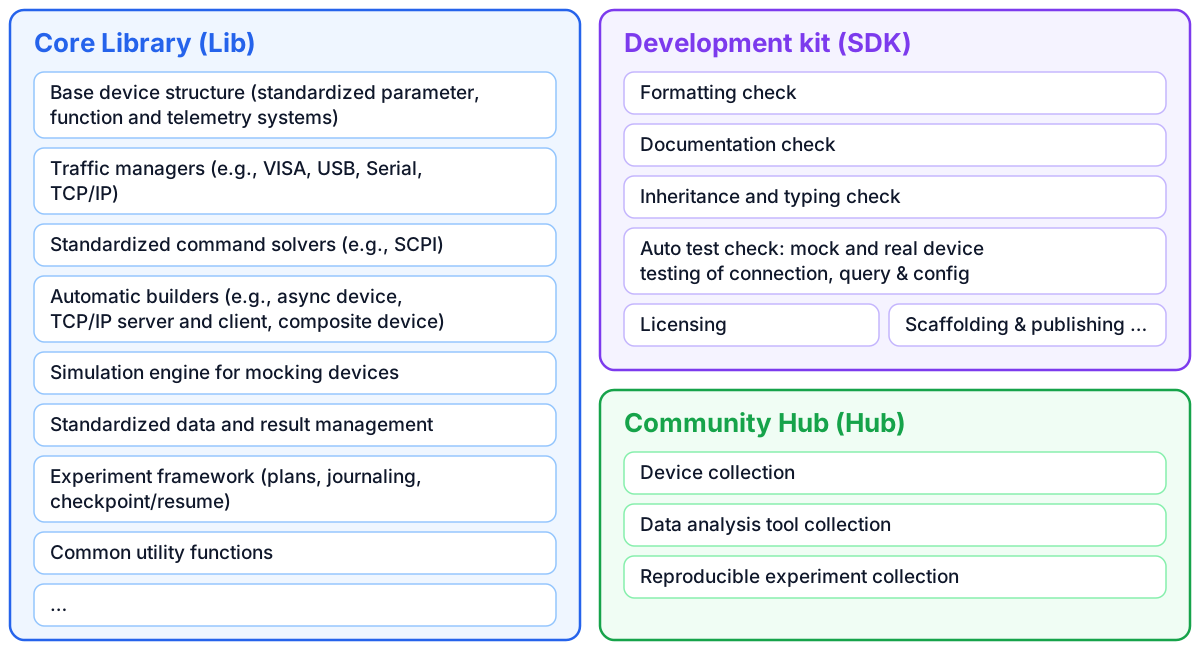 Figure 1 Plesty components
This documentation introduces PlestyLib. Code built on it comes in three kinds, each a module of its own: a device controls one instrument, an experiment runs a measurement with devices, and an analyzer turns recorded data into a result. PlestyLib gives each kind a standard shape, so that every instrument is driven the same way and every measurement is recorded the same way.
Standardized devices
A device is separated into six Python layers above the hardware and firmware provided by the manufacturer (Figure 2):
Traffic Manager — manages the connection and messaging between Python and the instrument through the manufacturer’s protocol or API.
Command Logic Solver — translates standardized Plesty operation calls into the vendor format and converts responses back.
Synchronized Device — the abstract base layer you inherit to define a real, functioning device.
Asynchronous Device Wrapper — turns a synchronized device into an asynchronous one.
TCP/IP Serving Wrapper — exposes the device over the network.
TCP/IP Client — operates a remote device with the same syntax as a local one.
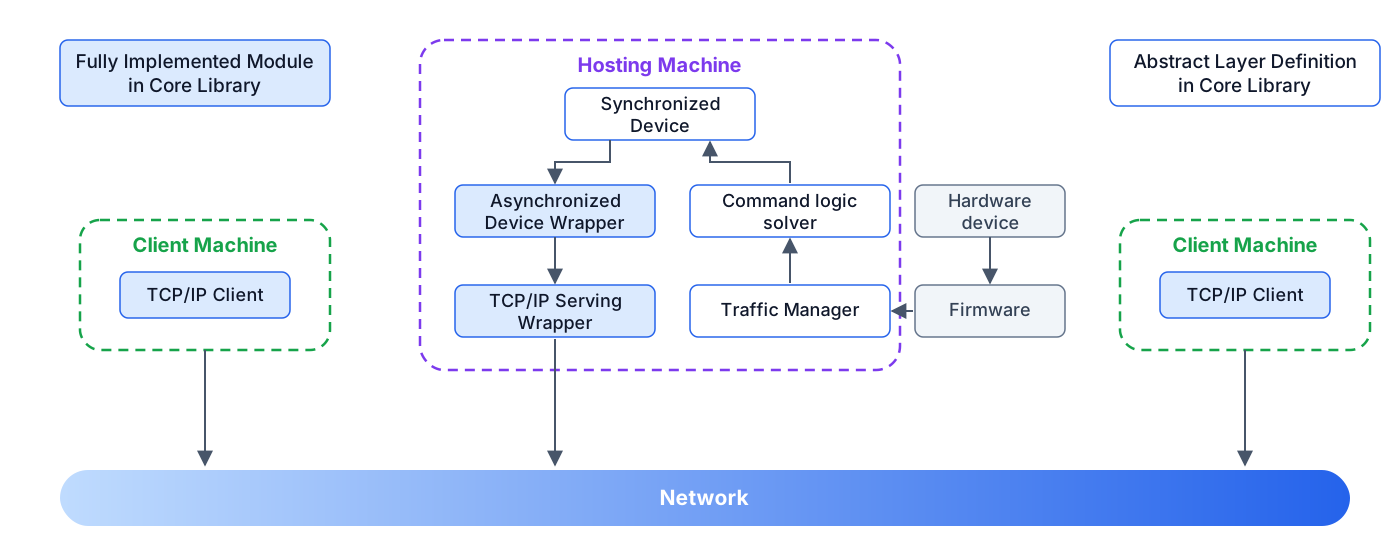 Figure 2 Plesty layers for standardized device
The upper layers (async wrapper, TCP/IP server, client) are fully implemented — API developers only complete the lower layers, and PlestyLib ships common traffic managers (serial, VISA, TCP/IP, Thorlabs APT) and command solvers (e.g., SCPI) to shorten even that. A Device in the quick start builds a complete power-meter API in about thirty lines.
Inside the synchronized device
The synchronized device combines three ingredients (Figure 3):
Abstraction — the four operations every instrument shares: connect, disconnect, query, write.
Managing systems — the Parameter System validates every configuration value against a JSON schema (generatable by an LLM from the vendor manual), the Function System registers device operations the same way, and the Telemetry system gives every device a cheap
status()snapshot plus a hookable event stream of readings, state changes, and errors.Utilities — parameter synchronization to/from the hardware and a structured documentation model (
doc_model()) that renders standardized docs for any device.
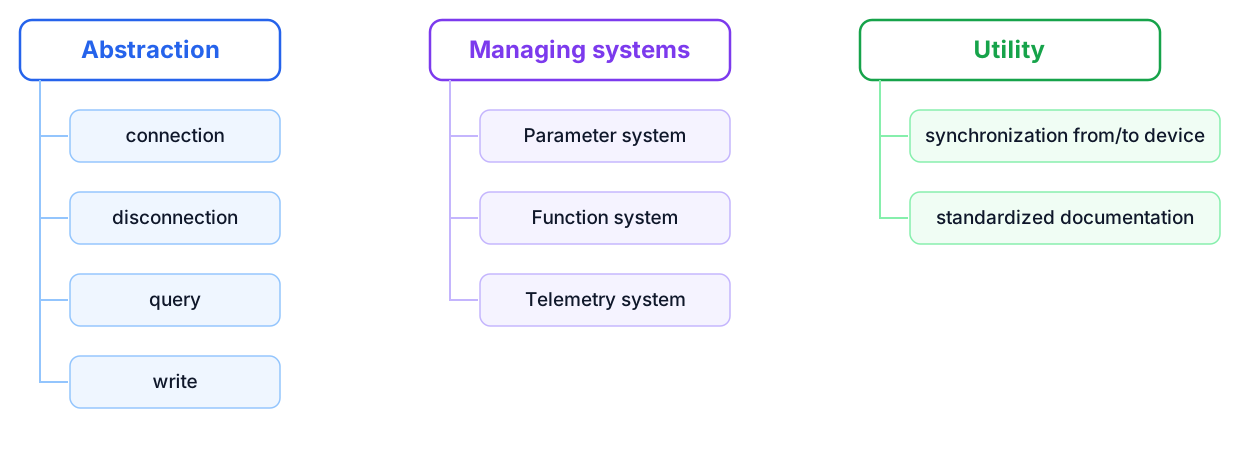 Figure 3 Structure of synchronized device
Beyond a single instrument, CompositeDevice groups several devices (local
or remote) behind one object with resilient remote calls — timeouts trigger
an automatic client rebuild and retry, so multi-device setups such as
scanners inherit robust networking for free.
Standardized analyzers and experiments
An experiment runs a measurement as a list of steps, its plan, fixed before the first step runs. An analyzer turns data into a result; an experiment’s steps call analyzers, and an analyzer can also be run on a finished measurement later. Everything a measurement produces goes into one folder per run, and that folder is the only place the programs involved meet (Figure 4).
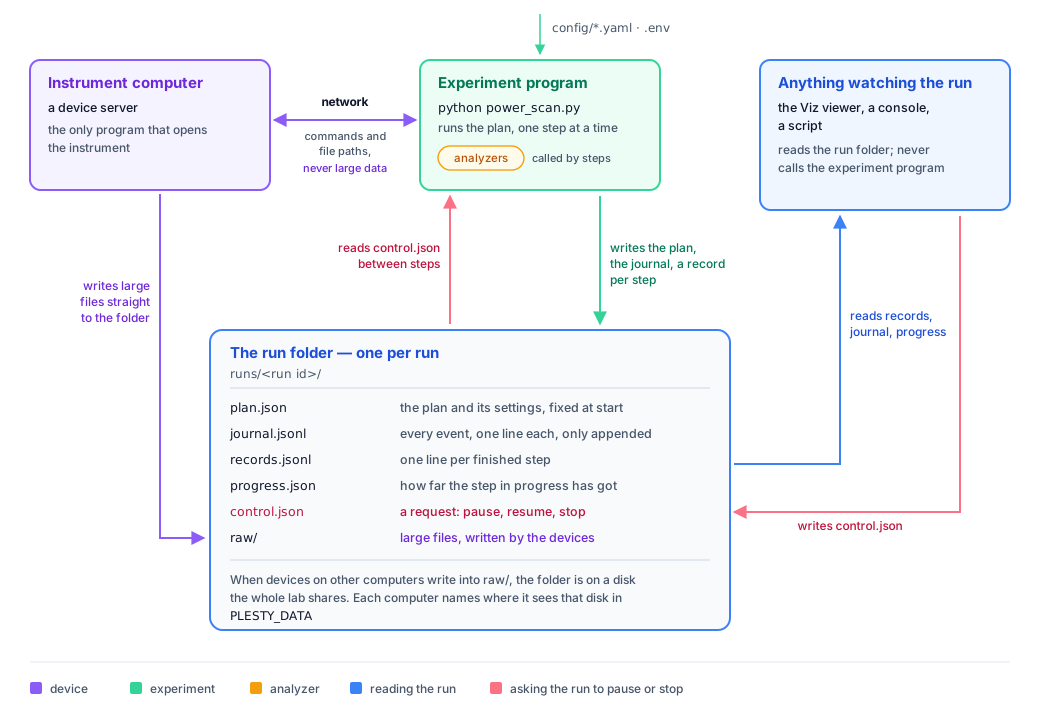 Figure 4 Data flow of a run
Devices send commands and file paths over the network; large files, such as spectra, are written by the device straight into the run folder, so they cross the network only once.
The experiment saves its plan, a journal of everything that happens, and one record per finished step. Because every finished step is saved, a stopped or crashed run continues where it stopped, and a run refuses to continue if its plan was changed in between.
Analyzers declare what they take and give, check both, and record on every result how it was made: which analyzer, which version, which settings. They can write a report of what they found, as tables, figures and text.
Anything watching the run, such as a viewer that plots the data as it arrives, only reads the folder, so it cannot disturb the measurement. A request to pause or stop is the one thing written back in.
Where a Measurement’s Data Goes explains the figure in detail. All data follows one of three documented forms (Data & Metadata Schemas):
Domain |
What it covers |
|---|---|
Device configuration |
typed, validated parameters ( |
Operational telemetry |
status snapshots and timestamped events ( |
Experimental output |
crash-safe results: raw blob + typed JSON metadata ( |
Every kind of module also comes with ready-made tests that run without the instrument (Testing).
Where to go next
Quick Start — a device, an experiment and an analyzer, from nothing to a working result
Concepts — how data moves, how instruments are checked, how the library is built
Device — base devices, parameters, operations, composite devices, remote access
Experiment Framework — plans, the command line, stopping and continuing, reading runs
Analyzer Framework — writing analyzers, reports, spectrum fitting
Viewing a Run — plotting a run while it is measured
Common to All Modules —
.env, YAML configuration, logging, data typesTesting — the tests every module runs, with and without the instrument
API Reference — the full generated reference