Packages and Layers

plesty-lib is one Python package, plesty.lib, divided into subpackages. This page says what each subpackage is for, and which ones may import which: the rule that keeps a change in one part from breaking another.

The subpackages

Package

What it is for

plesty.lib.utils

Small shared tools: logging setup, error handling, .env reading (EnvSettings), YAML reading (module_config, load_yaml), the registry that stops two device objects in one program from opening the same instrument, and helpers for loading vendor DLLs.

plesty.lib.data

Data types and saving them: PlestyArray (a NumPy array with a name, unit and description), tables, SpectrumData, and writing results to disk (save_result, ResultDocument, optional HDF5 export).

plesty.lib.traffic

Moving bytes to and from an instrument: serial, VISA, TCP/IP and Thorlabs APT connections, plus USB helpers. Each connection type is a traffic manager. It knows nothing about parameters or operations.

plesty.lib.solver

Translating a parameter or operation into the instrument’s own command, and its reply back. Each translator is a solver; SCPISolver handles SCPI instruments.

plesty.lib.device

Devices: the base class every device inherits (BaseDeviceSyncModel), ready-made base classes such as BaseVisaScpiDevice, the wrapper for asynchronous code, and CompositeDevice.

plesty.lib.service

Using a device over the network: the server, the client, and the manager that lets several clients share one instrument.

plesty.lib.experiment

Experiments: Experiment, Plan and Step, the journal, reading runs back (Run), the command line (ExperimentCLI), and the requests that pause or stop a run (control).

plesty.lib.analyzer

Analyzers: the Analyzer base class, and SpectrumFit.

plesty.lib.report

Reports: Report and its tables, figures and text, saved as a file and turned into HTML or LaTeX.

plesty.lib.monitor

Watching a run: Viz, RunData, Plot and the things a plot draws (Line, Image, …), plus ready-made plots such as Spectrum. Also the older Monitor classes. Needs no GUI toolkit itself.

plesty.lib.ui

Windows: the main window (Shell), panels, device control panels, and the colours and styles. Everything that needs Qt is inside plesty.lib.ui.qt, behind the gui extra.

plesty.lib.sim

Stand-ins for hardware: DemoDevice, DataGenerator (random values that fit a parameter’s type and range) and AptMotorSimulator (a pretend Thorlabs motor controller). See Simulation.

plesty.lib.test

Ready-made tests that a device, experiment or analyzer module runs on itself, with and without the instrument. See Testing.

Which package may import which

The subpackages form layers. A package imports only from the layers below it, never from above. This keeps the lower layers usable on their own: a device server does not load anything about experiments or windows, and a change to the viewer cannot break a device.

Layer

Packages

Imports from

6 — testing

test

any layer below

5 — results

analyzer, report

analyzer: data, report. report: data, the drawables of monitor, and the colours of ui

4 — viewing

monitor, ui

monitor: experiment, data, utils. ui: monitor, and Qt inside ui.qt only

3 — experiments

experiment

device, service, traffic, data, utils

2 — devices

device, service, sim

device: service (see below), solver, traffic, data, utils. service: device, utils. sim: device, traffic, data

1 — connections

traffic, solver

traffic: utils. solver: utils, and the parameter and operation descriptions of device (see below)

0 — foundation

utils, data

nothing else in plesty-lib

analyzer sits high because an analyzer’s report can include figures, which are drawn with the same drawables as the viewer. The analysis itself uses only data.

Exceptions

A few imports go the other way. Each is deliberate, and each is either confined to one place or made inside a function, so it happens only when that function is called:

From

To

Where, and why

device

service

base_device_sync.py uses the service’s resource manager to share an instrument between clients, and composite_device.py opens clients for remote devices. The server in turn wraps a device, so the two packages work as a pair.

solver

device

only the classes that describe a parameter or an operation (ConfigParameter, FuncMeta), not the device base class

data

experiment

inside SpectrumData.from_run, which reads spectra out of a run

experiment

monitor

inside Run.source, which hands a run’s records to the older Monitor classes

monitor

ui

inside Viz.main, which opens the window

Inside a device

A device itself is built from six layers, from the instrument up to a client on another computer. Only the bottom two are written for each instrument:
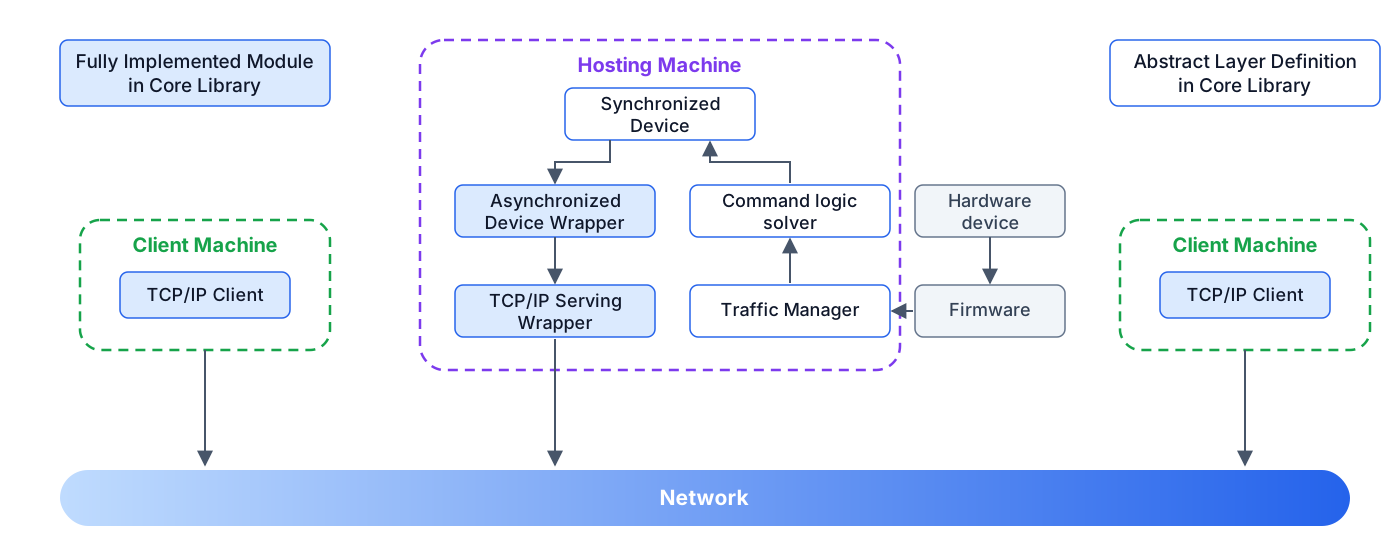
Device layer architecture: hosting machine, hardware, clients and network

PlestyLib, the first page of these docs, walks through this figure.