Where a Measurement’s Data Goes
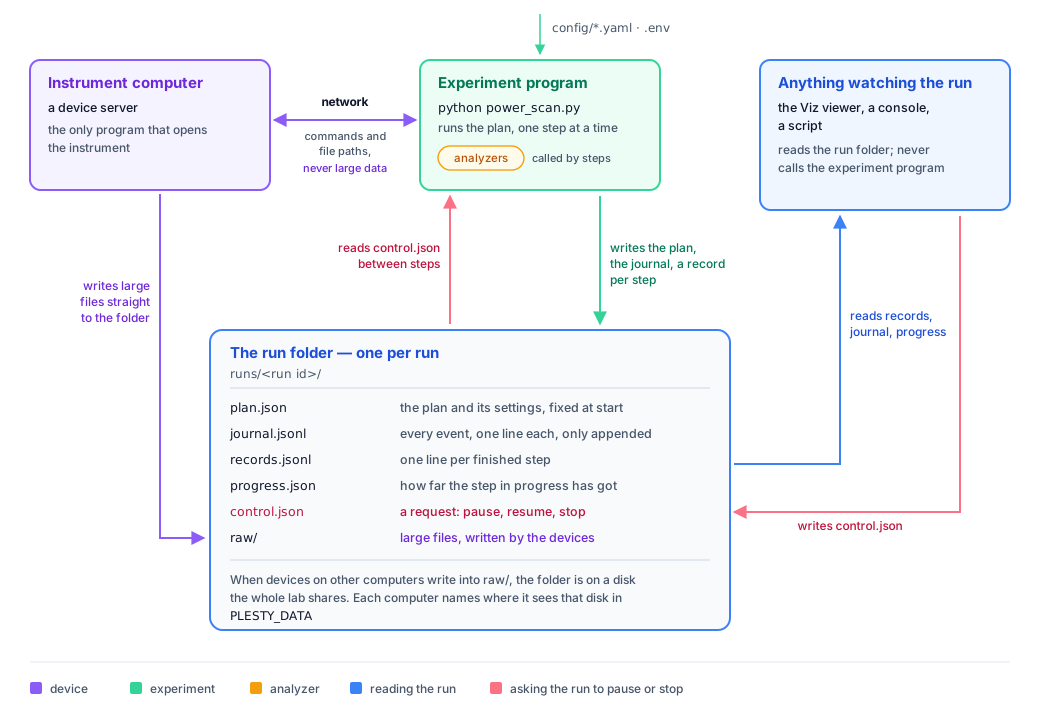
A measurement involves several programs: the experiment that runs it, one server per instrument, and whatever shows the data while it comes in. This page shows how data moves between them. In short: each run has one folder, and that folder is the only place the programs meet. The experiment writes it, everyone else reads it, and the only thing written back in is a request to pause or stop.
The terms used here (plan, step, run, journal, records) are introduced in How plesty-lib runs a measurement.
The run folder
Every run gets its own folder, named after the experiment and the time it started,
for example runs/powerscan_20260925-101534/:
File |
Written by |
Holds |
|---|---|---|
|
the experiment, at the start |
the plan and the settings it was built from; never changed afterwards |
|
the experiment |
one line per event (run started, step started, step finished, paused, stopped, …), only ever appended |
|
the experiment |
one line per finished step: what the step returned |
|
the experiment |
how far the step in progress has got, for a progress bar |
|
anything driving the run |
a request: pause, resume, cancel or abort (see Asking a running measurement to pause or stop) |
|
the devices |
large files, such as spectra and images, one subfolder per device |
A .jsonl file holds one JSON document per line. Adding a line never rewrites the
lines before it, so a crash can at worst leave the last line incomplete, and the
next reader ignores it.
Large data never crosses the network twice
A spectrometer or a camera produces files of megabytes per step. Sending them from
the instrument’s computer to the experiment, and from there to disk, would move each
one twice. Instead, the device writes the file straight into the run’s raw/
folder, and only the file’s path travels back to the experiment, which saves the
path in the step’s record.
For that to work when the instrument is on another computer, the run folder must be
on a disk that both computers can reach: a network drive that the whole lab shares.
Each computer may see that disk under a different path (/mnt/lab on one,
G:\Lab on another), so each one names its own path in the environment variable
PLESTY_DATA, and every path recorded in a run is relative to it.
Data on a Shared Disk shows how to
set it up.
A run on a single computer needs none of this: without PLESTY_DATA, runs go to a
local folder and devices write no files of their own.
Reading a run never disturbs it
A program that shows a run’s data, such as a viewer made with Viz (see
3. Watch the data), reads
records.jsonl and remembers how far it got. At each refresh it reads only the
lines added since, however long the run has been going. It never talks to the
experiment program, so it cannot slow it down or interrupt a step, and any number
of viewers can watch the same run.
A record line is written only after everything the step produced is on disk. A reader that sees a line can therefore trust that the data it names is complete.
Asking a running measurement to pause or stop
The experiment program cannot be called from outside: it runs on its own and may
have been started by someone else, or on another computer. So a request to pause or
stop is also a file in the run folder, control.json. The experiment program reads
it itself, at the moments shown here:
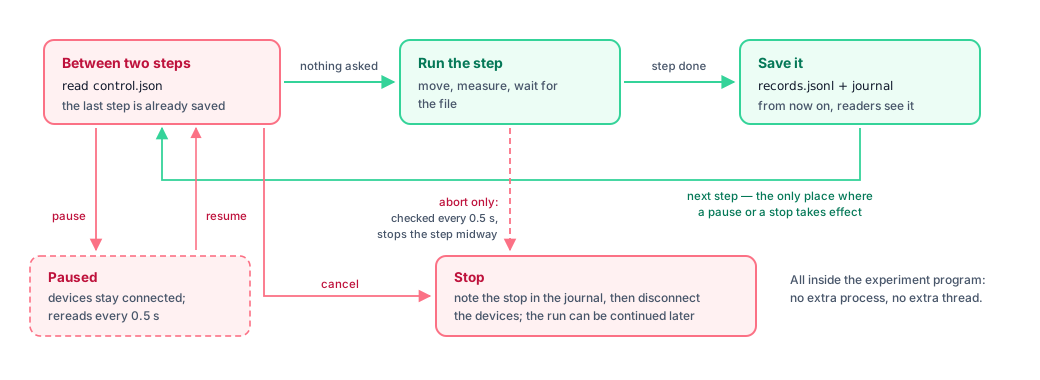
Between two steps, the experiment reads
control.json. This is where a pause and a stop take effect, because the previous step is completely saved and no instrument is in the middle of an operation.While a step runs, only an abort is checked, every half second. An abort stops the step midway; that step is not saved, so continuing the run later repeats it.
Write a request with the functions in plesty.lib.experiment.control. They need
only the run’s folder, not the experiment object:
from plesty.lib.experiment import control

run_dir = "runs/powerscan_20260925-101534"

control.pause(run_dir)                      # wait before the next step
control.resume(run_dir)                     # go on
control.cancel(run_dir, "sample drifted")   # finish this step, then stop
control.abort(run_dir, "laser off")         # stop now, even in the middle of a step
control.report(run_dir, "helium refilled")  # a note, added to the journal between steps
A stopped run is marked in the journal as canceled or aborted, and can be continued like any other interrupted run (see Stop it and continue).
Why a folder, and not a direct connection
The run outlives the programs around it. A viewer or a console can be closed and reopened without affecting the measurement, and a console opened later can still drive a run it did not start.
Anyone who can reach the folder can drive the run: a script, a second console, someone logged in over SSH.
It works the same on every operating system. Windows cannot send the interrupt signal that
Ctrl-Csends on macOS and Linux, but every system can write a file.Nothing extra has to be running. There is no database or message service to install or keep alive; copy the folder, and the run can still be read years later.
The cost is small: one read of a small file between steps, and one every half second while a step runs.