Viewing a Run
A viewer shows a run’s data as plots while the measurement goes on, and can play
a finished run back or save it as a video. It lives in plesty.lib.monitor.
A viewer only reads the run folder (see Where a Measurement’s Data Goes). It never talks to a device or to the experiment program, and writes nothing back. So a viewer can be opened, closed and opened again in the middle of an eight-hour run, and any number of them can watch the same run, without affecting the measurement.
The layers of a viewer
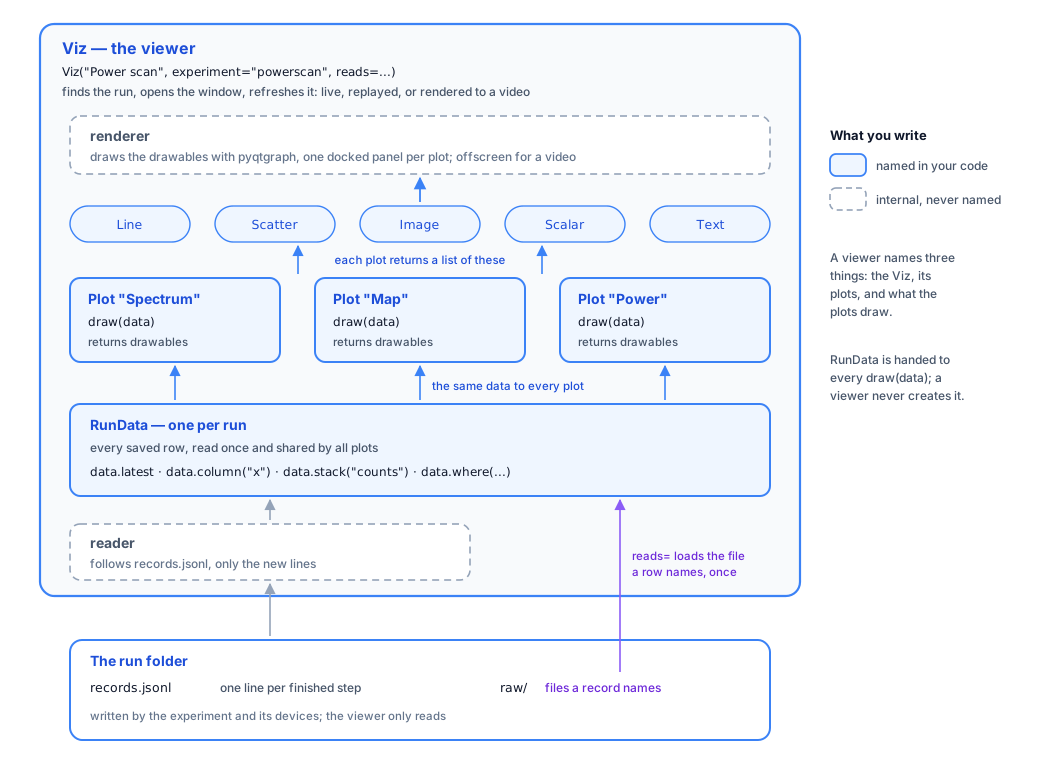
From the bottom up:
Layer |
What it does |
Who writes it |
|---|---|---|
the run folder |
holds |
the experiment and its devices |
reader |
follows |
internal |
|
keeps every row read so far and answers questions about them ( |
internal; you write only |
|
a title and |
you |
drawables |
|
you choose them |
renderer |
draws the drawables with pyqtgraph, in one docked panel per plot, or offscreen when saving a video |
internal |
|
the viewer as a whole: finds the run, opens the window, holds the plots, and refreshes them |
you create it, once |
So a viewer names three things: the Viz, its plots, and what the plots draw.
When something goes wrong
A plot that raises an error does not stop the others: its panel shows the error in
its title bar, and the rest of the window goes on. The same holds for reads=: a row
whose file cannot be read yet just lacks its extra fields.
In this chapter
Page |
Covers |
|---|---|
creating a viewer, and starting it to watch, replay or save a video |
|
what a plot can ask about the run, and reading files that rows name |
|
the three ways to write a plot, and what it can draw |
|
spectra, spectral maps and series that need no code of your own |
|
testing plots without a window |
|
the window around the plots, device control panels, themes and recording |