Running
Running it on a bench
In the Bench app:
Install — Hub ▸ Browse…, kind experiments,
plesty-pol-plfrom its Repository (git): the configuration files are in the repository, not in the release. Installing writes the module’s.env.Create — on the Experiments tab, Create a run from
config/default.yaml.Configure — Experiment Config is this run’s settings (Setup); Device Setup edits
setup.yamland.envtogether: the benches, where each sees the shared data disk, and which bench runshwpandspec.Run — the bench checks that every bench sees the same shared disk, starts
hwpandspecon their benches, gives the run their addresses andPLESTY_DATA, and opens the viewer in the run’s Visualization pane.Pause, Stop or Abort from the run’s card; Resume continues a stopped or aborted run. When the run ends the bench stops the device servers it started.
A device address set by hand in .env (HWP_ADDRESS=tcp://…) points the run at
that server, and the bench leaves the device alone.
Running it from the command line
With the device servers already running and their addresses in .env
(Setup):
uv run python -m plesty.pol_pl --dry-run                       # check the plan
uv run python -m plesty.pol_pl --config config/default.yaml    # run
uv run python -m plesty.pol_pl --resume <run_id>               # continue
uv run python -m plesty.pol_pl --run-root <dir>                # runs elsewhere than <PLESTY_DATA>/pol-pl
Before the first step the preflight checks that each server answers and offers the operations the rig needs, so a wrong address stops the run at start-up.
Running it without a lab
The easy way is the Bench app’s welcome (Help ▸ Welcome… ▸ Install the demo), which does all of this. By hand:
# fleet up saves into the file it is given, so give it a copy (plesty-bench#48)
cp setup.yaml /tmp/pol-pl-fleet.yaml
# the spectrometer needs a folder to write in; plesty-server before 0.5 gives
# none on a bench without a share
LOCAL_DATA=/tmp DEVICE_DATA_ROOT=/tmp DEVICE_DATA_PATH=/tmp \
  plesty-server -f /tmp/pol-pl-fleet.yaml fleet up
plesty-server -f /tmp/pol-pl-fleet.yaml fleet status   # the two ports
HWP_ADDRESS=tcp://localhost:<hwp port> SPEC_ADDRESS=tcp://localhost:<spec port> \
  PLESTY_DATA=/tmp uv run python -m plesty.pol_pl --config config/demo.yaml
plesty-server -f /tmp/pol-pl-fleet.yaml fleet down
setup.yaml starts both devices on this machine, each pinned:
Device |
Is |
|---|---|
|
|
|
a fixed commit of the |
The recording holds QD-001, QD-002 and QD-003 at 0–178° in 2° steps; pick the
dot in config/demo.yaml. A step it does not hold is refused, not answered
with another spectrum. This is the demo the Bench app’s welcome sets up.
It is a real run — the same plan, records and analysis, resumable the same way. Nothing in the module knows it is a demo; only the setup differs.
Driving a run
A run is driven through a file in its run directory:
from plesty.lib.experiment import control

control.pause(run_dir)  # hold before the next angle
control.report(run_dir, "realigned QD-01")  # note what happened, where it happened
control.resume(run_dir)
control.cancel(run_dir)  # finish this spectrum, then stop
control.abort(run_dir, "sample burning")  # stop now; this spectrum is lost
Each takes effect between two angles. Pause keeps both devices connected
and where they are. Cancel lets the exposure in flight finish, up to
spectra.file_visibility_timeout_s. Abort does not wait; that angle runs
again on resume.
Watching a run
The bench opens the viewer on the runs it starts. By hand:
uv run python -m plesty.pol_pl.viz monitor                       # the newest run, live
uv run python -m plesty.pol_pl.viz monitor --run <run_id> --replay 1
uv run python -m plesty.pol_pl.viz render --run <run_id>         # <run_id>.mp4
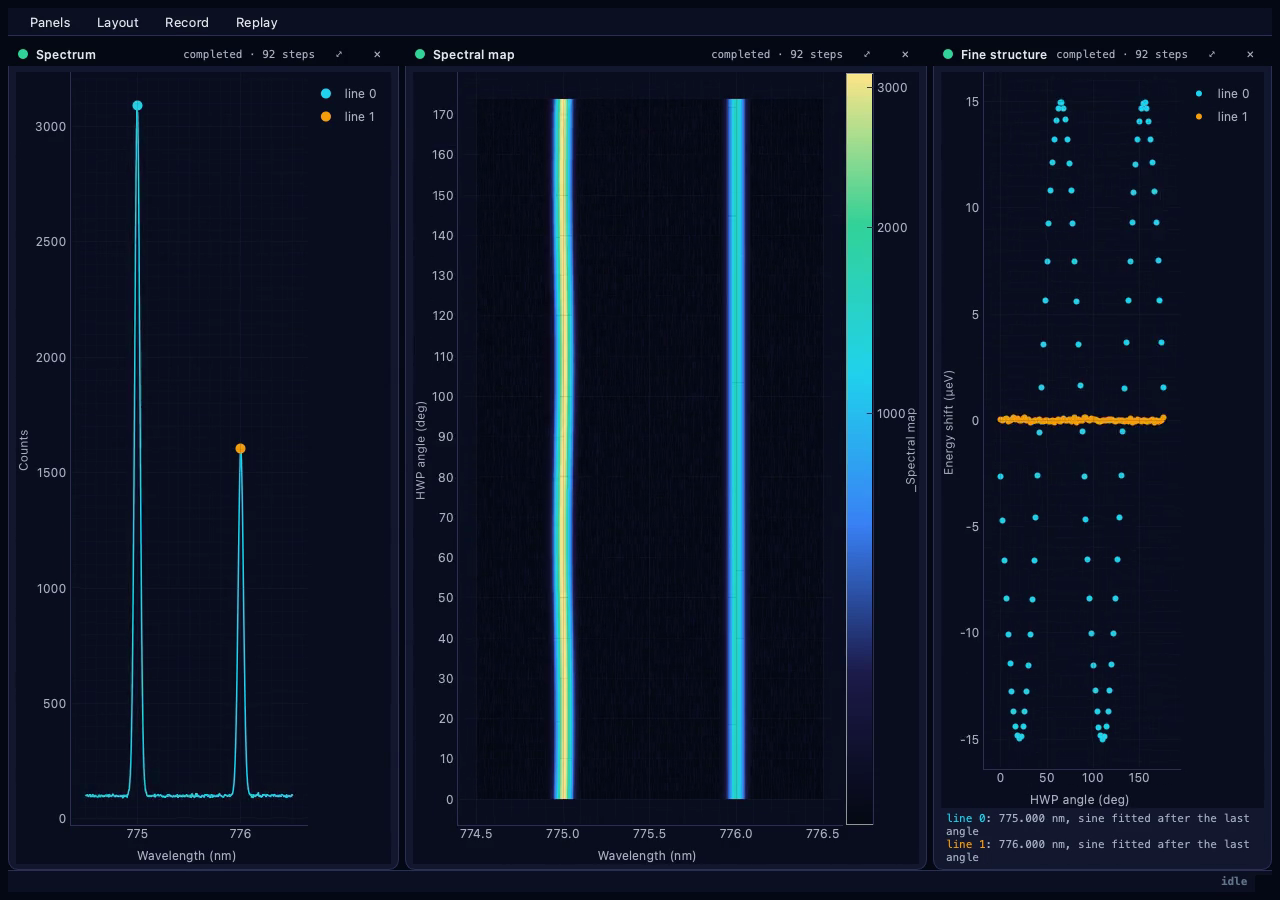
Each line has the same name and colour in every view; line 0 is the shortest
wavelength.
View |
Shows |
Read in |
|---|---|---|
Spectrum |
the newest spectrum, a marker on every line followed |
|
Spectral map |
every spectrum so far against the plate angle, √ scale, cosmic rays removed |
|
Fine structure |
each line’s shift against the angle as it is measured; after the last angle, the analysis’s fits and results |
What a run writes
<PLESTY_DATA>/pol-pl/<run_id>/
├── plan.json        the frozen plan: one step per dot per angle, one analysis per dot
├── journal.jsonl    every step started / completed / failed
├── records.jsonl    one line per step:
│                      spectrum   qd, position_um, hwp_deg, hwp_reported_deg, data_file,
│                                 acquisition_started_utc, acquisition_ended_utc,
│                                 exposure_ms, frames, grating_center_nm
│                      analysis   qd, spectra, lines [center, fss_ueV, fss_err_ueV,
│                                 fss_valid, axis_deg], warnings, *_document
├── analysis/        <dot>_fine_structure, <dot>_line_fit, <dot>.report.json
└── raw/spec/        the spectra, under the spectrometer's bench folder of the share
data_file is relative to the shared disk — platform-a/pol-pl/<run_id>/raw/spec/<file>
for a spectrometer on the bench whose folder is platform-a. The saved outputs
load with ExperimentData.load; the report renders with
plesty.lib.report.Report.load(path).to_html() without importing plesty-fss.
Ends |
Plate |
|---|---|
completed, cancelled, aborted, failed |
parked at 0° |
resumed |
homed again, then the next angle |