The console is the desktop window of plesty-bench, the core project that manages a bench PC — the computer wired to the lab instruments. Until this month it managed devices. It now has an Experiments tab: create a run, fill in its settings as a form, start / pause / stop it, and watch the data arrive in the experiment's own plots — without writing a line of GUI code per experiment.
Two words used throughout: an experiment is a hub module that orchestrates several devices through a measurement plan; a run is one execution of it, which writes everything it measures into a run folder of its own (one line per finished step in records.jsonl, plus any raw files those lines name).
For users — running an experiment from the window
UsersOpen the console (PLESTY Bench in the start menu / Launchpad, or plesty-server gui in a terminal). The Experiments tab is in front. The upper table lists one row per run, with its state (created, running, paused, completed, stopped, aborted) and progress such as 5/12 steps.

- Create opens Create run: choose the experiment, a config file and a run id. The run is created, not started.
- Configure (or double-click the row) shows two tabs:
- Experiment Config — the experiment's settings as a form: a spin box with its unit for a number, a drop-down for a choice, +/− rows for a list. Edit YAML… opens the file itself. Once a run has started its settings are read-only — Duplicate it to measure again with changes.
- Device Setup — which benches the experiment runs across, and which device runs on which bench.
-
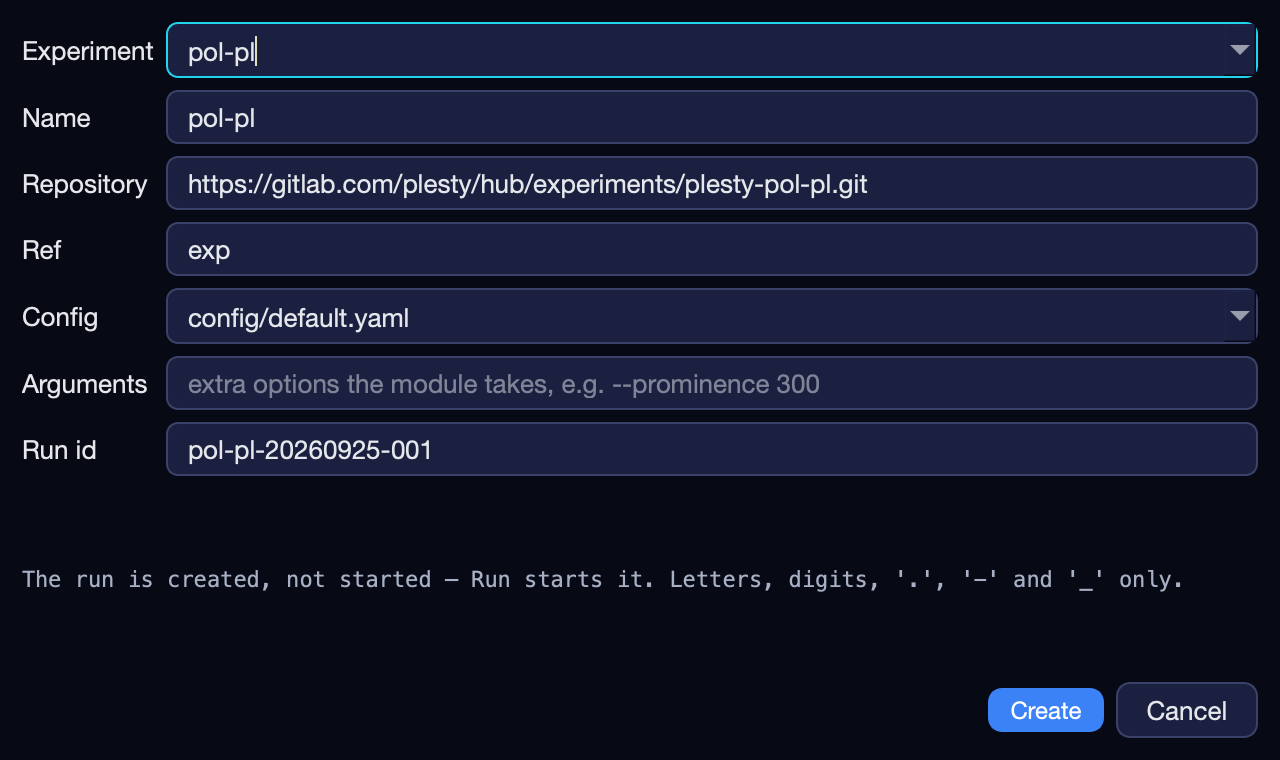
Create run: pick the experiment and its config; the run id is filled in. 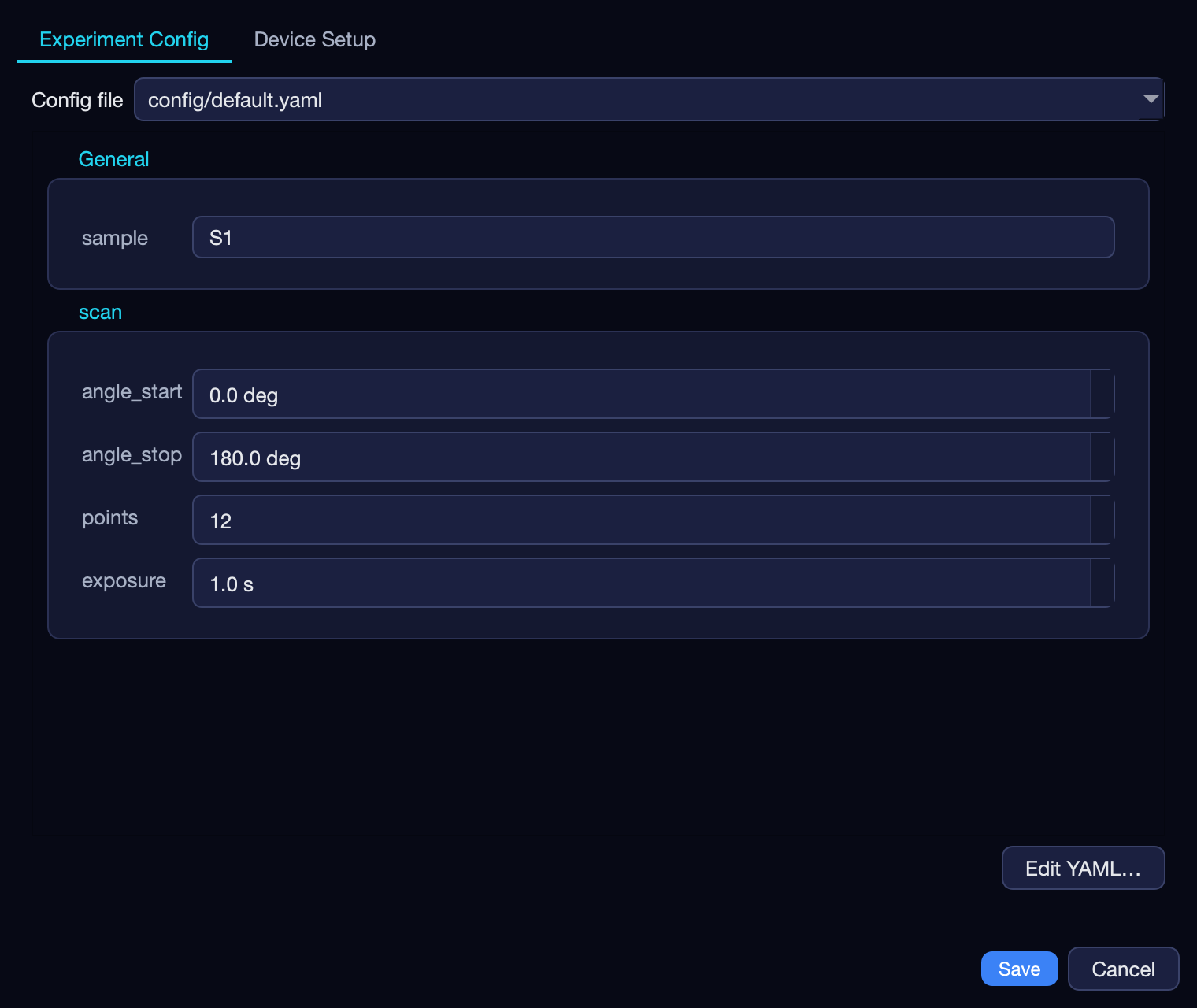
Experiment Config: the form is generated from the experiment's own settings schema, units included. - Run opens every instrument the experiment needs, then starts. Pause, Stop and Abort all wait for a step boundary — a step commits whole or not at all — so a request made during a long exposure is pending, not ignored. A stopped run offers Resume, skipping the steps already done.
- Four panes follow the selected run: Log (the run's output), Data (its last 50 records), Report and Visualization.
The Visualization pane
If the experiment ships a viewer, the pane shows that experiment's own plots, live, while the run goes on — the same views its author sees when running it from a terminal. If it ships none, the console draws plots of the run's recorded numbers instead.
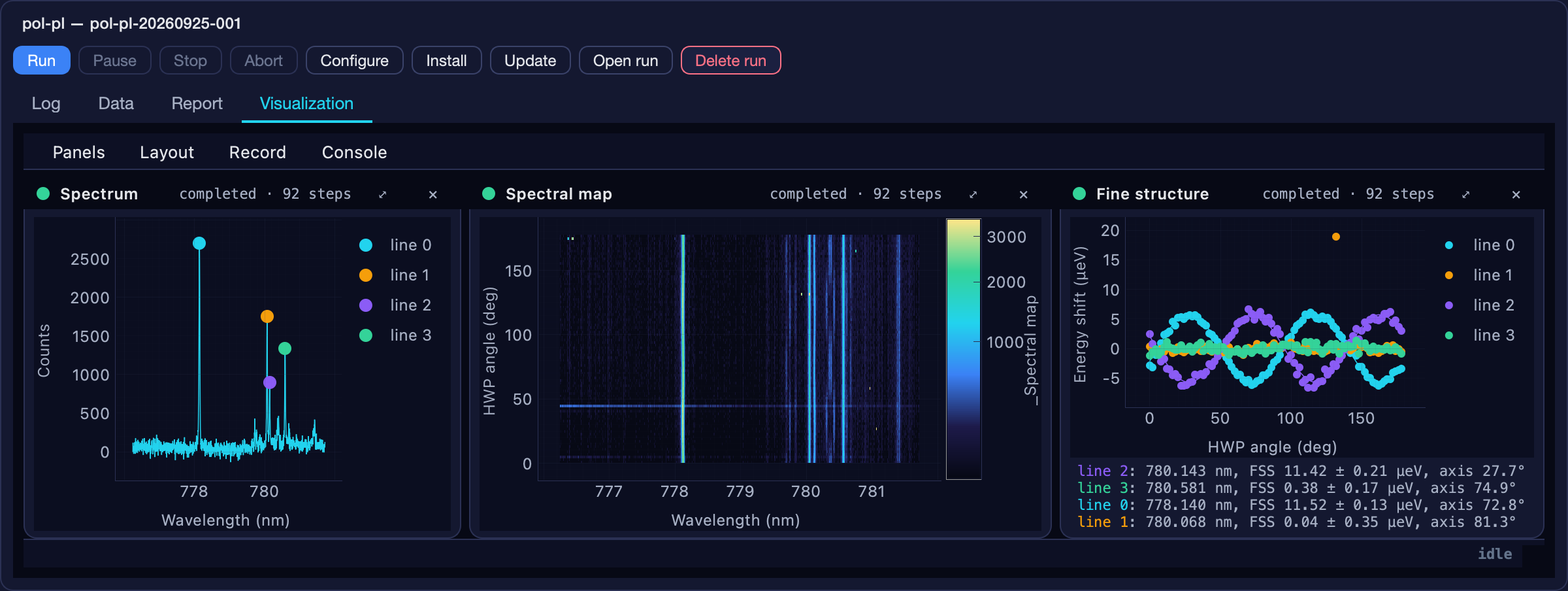
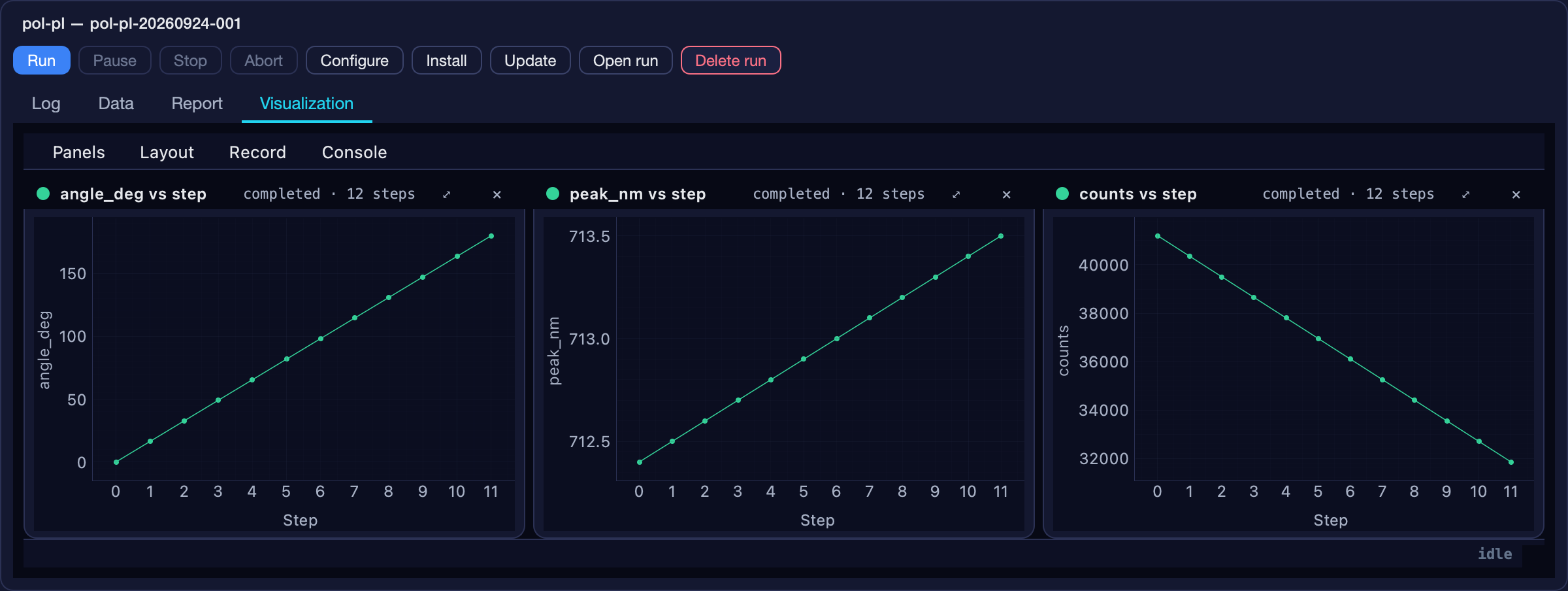
- Open in its own window runs the viewer as a separate program.
- On the views' menu bar, Console ▸ Open these views in a window floats them out of the pane; Bring the views back here docks them again.
- Watching is passive: a viewer only reads the run folder and never talks to a device, so it can be opened and closed mid-run without touching the measurement.
plesty-lib, Qt and numpy stay the console's. If the views still cannot load — for example the environment uses a different Python version — the pane now says so and why, with the button to open them in their own window, instead of silently falling back to generic plots.Operation forms send the right type
The same release fixed the device control forms the console opens: an argument is now edited according to its declared type, including optional ones such as float | None. An optional argument you leave untouched shows as device default and is left out of the call, so the device keeps its own value — previously it went out as 0, which a timeout reads as “give up immediately”.
From another machine
Alongside the tab, the console can now drive more than one bench. Each bench runs an agent — a network service guarded by a shared token. One bench is set as master and lists the others (Server ▸ Benches…); their devices appear in the same table under a Host column, and Fleet up / Fleet down reach them too. From a laptop without any window, the plesty-bench command line does the same:
uv tool install plesty-bench
export PLESTY_BENCH=lab-bench-03 PLESTY_BENCH_TOKEN=…   # the bench and its token
plesty-bench status
plesty-bench control pm100d                            # needs plesty-bench[control]
For developers — giving your experiment a form and a viewer
Developers & contributorsThe console holds no code for any particular experiment. Everything it shows comes from two things your module declares.
1. The manifest: what the form is built from
An experiment built on plesty-lib describes itself in a Manifest. python -m <module> --manifest prints it without connecting anything, so the console can ask what the experiment takes before a run exists. The settings schema uses the same form as a device's parameters, which is why one form builder serves both. The viz field names the viewer module. From the polarization-PL experiment:
MANIFEST = Manifest(
    module="plesty.pol_pl",
    title="Polarization PL",
    schema=SCHEMA,                      # settings: type, unit, description
    environment=[EnvVar("SPEC_ADDRESS", "ZMQ address of the spectrometer server."), …],
    run_root=RUN_ROOT,
    viz="plesty.pol_pl.viz",            # the viewer the console docks
)
2. The viewer: Viz, RunData, Plot
The viewer API in plesty.lib.monitor was reduced this month from a stack of nine concepts to three you write. What remains:
reads=draw(data)youLine, Scatter, Image, Scalar, Textyou choose# plesty/my_exp/viz.py
import sys
from plesty.lib.monitor import Line, Viz
viz = Viz("Power scan", experiment="powerscan")
@viz.plot("Power")
def power(data):
return [Line(x=data.column("wavelength_nm"), y=data.column("power_w"),
x_label="Wavelength (nm)", y_label="Power (W)")]
if __name__ == "__main__":
sys.exit(viz.main()) # monitor / --replay / render to video| Need | Use |
|---|---|
| One field across all rows | data.column("hwp_deg") |
| An array per row (a spectrum), as a 2-D map | data.stack("counts") |
| Newest row that has a given field | data.last("counts") |
| A row that only names a file on disk | Viz(..., reads=fn) — called once per row, cached |
| A plot that remembers state between refreshes | subclass Plot, annotate draw() with Drawing |
| A panel that is not a plot (a table, readouts) | override Plot.build() and return any Qt widget |
Style travels with the values: each drawable carries its own label, color and axis labels, and color is a palette name (cyan, violet, mint, amber, rose, blue), never a hex code, so every experiment's views look alike. A single RunData per run means three plots of the same scan read the run's file once between them, and each sees every row.
load_viz("plesty.my_exp.viz"), which imports your module and expects exactly one Viz at module level, then viz.view(run) to place it in the pane. Keep the viewer importable without side effects and keep a single Viz per module, and it works both standalone and docked.Testing it without a window
A plot is a plain function of the data, so it tests without a screen or the gui extra. Keep a small finished run — made once against simulated devices — in your tests:
from plesty.lib.monitor import Line, RunData
from plesty.my_exp.viz import power

def test_power_draws_one_point_per_step():
    data = RunData("tests/runs/powerscan_20260925-101534")
    data.poll()
    drawing = power(data)
assert isinstance(drawing[0], Line)--replay now paces a finished run by records rather than lines of the file, so views that keep only a few records stay in step with the ones that keep them all. Rely on records, not file position, in your plots.Contributors to the console itself: the Experiments tab lives in plesty-bench (plesty/server/view/ and plesty/server/presenter/); the viewer contract and the drawables live in plesty-lib under plesty.lib.monitor. A change to what a viewer can draw belongs in plesty-lib, so both the console and the stand-alone viewer get it.